An employee pastes a client’s draft contract into ChatGPT to get a quick summary. No malice, no second thought — it feels like using a search engine. But if the account’s training setting is left on default, that contract text may now be stored and used to improve OpenAI’s models.
If your business signed a confidentiality agreement or an NDA promising client data won’t be shared with third parties, you may have just done exactly that, without anyone realizing it.
This is what makes chatgpt business data privacy a genuinely different problem than most generic “AI privacy tips” articles treat it as. It isn’t a nice-to-have setting. For a business under contract, it’s a live question of whether you’re honoring the confidentiality terms you already signed.
Key Takeaways for Management
Here’s what matters for chatgpt business data privacy at a glance:
- Free vs. Paid Defaults: Consumer AI tiers (ChatGPT Free/Plus, personal Copilot, consumer Gemini) train on your prompts by default. Business/Enterprise tiers do not.
- The Legal Reality: Pasting unvetted client data into an AI tool that trains on inputs constitutes a third-party disclosure under standard NDA terms.
- The Fix: Audit your account types, enforce business-tier logins, and toggle off data-training controls across all employee accounts.
Why This Is a Contract Problem, Not Just a Privacy Problem
Most service agreements and NDAs include some version of a standard clause: client data will not be disclosed to third parties without prior written consent.
That clause was written with human employees, contractors, and traditional software vendors in mind — not a generative AI training pipeline. But legally, sending proprietary data to an AI provider that retains rights to use it for model improvement is disclosure to a third party. The confidentiality clause doesn’t stop applying just because the “third party” is an algorithm rather than a person.
This connects directly to two things we’ve covered before. Shadow AI risk is about tools employees adopt without oversight — this is a narrower, sharper version of the same blind spot, where the tool itself might be authorized, but the privacy settings inside it were never vetted. In our guide to EU AI Act compliance, we highlighted how regulatory exposure and contractual exposure are merging — a single data-handling mistake in an unconfigured AI tool can trigger both simultaneously.
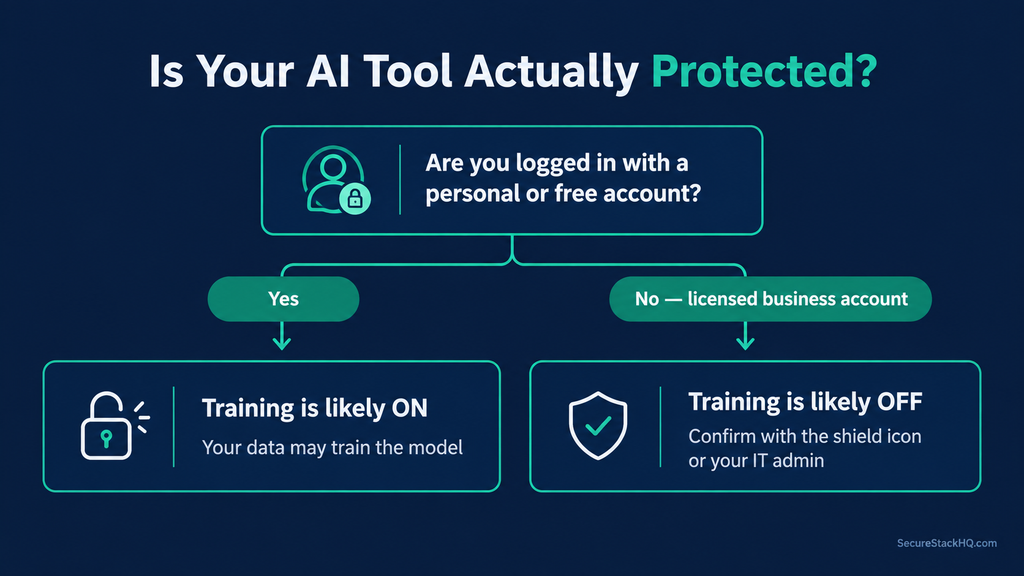
ChatGPT Business Data Privacy — Tool-by-Tool Audit
Here’s how the major AI platforms small businesses actually use handle data training by default:
| Tool | Free / Personal Account Default | Business / Enterprise Account Default | Where to Check & Toggle |
|---|---|---|---|
| ChatGPT (OpenAI) | Training is ON by default (Free, Plus, Pro) | Training is OFF by default (Business, Enterprise, Edu, API) | Settings → Data Controls → “Improve the model for everyone” |
| Microsoft Copilot | Personal account: training risk exists unless disabled | Licensed M365 Copilot: Enterprise Data Protection (EDP) is ON by default | Look for the “Protected” shield icon in the chat header |
| Google Gemini | Consumer Gemini: data may be reviewed and used for training | Gemini for Workspace: NOT used for model training by default | Workspace Admin Console / Gemini Apps Activity controls |
The real lesson of this audit: the pattern across all three providers is identical — the free or personal version of the tool your employees already know how to use is the one that trains on your data by default. The protected, compliant version requires your business to actually be on a properly configured business tier.
The Microsoft Copilot case is the easiest to get wrong. An employee signed into Copilot with a personal Microsoft account gets none of the enterprise data protections of someone using a company-licensed Microsoft 365 Copilot seat — even though the chat interface looks identical.
Note: for developers using the OpenAI API, inputs and outputs are not used for model training by default, making API integrations inherently safer than consumer web apps for this specific risk.
For OpenAI’s own explanation, see their official documentation on how data is used to improve model performance.
The Two-Minute Fix
For each tool your team uses, take these immediate actions:
- ChatGPT (Personal/Plus accounts): Settings → Data Controls → toggle off “Improve the model for everyone.” This prevents future chat data from being used to train models, but does not alter OpenAI’s standard 30-day safety retention window.
- Microsoft Copilot: Confirm with your IT admin whether employees are using licensed Microsoft 365 Copilot seats. If team members are using personal Microsoft accounts for work tasks, transition them to enterprise logins.
- Google Gemini: Direct employees to use their corporate Google Workspace logins rather than personal Gmail accounts when using Gemini for work.
⚠️ The “feedback loop” hidden trap: Even after you disable “Improve the model for everyone,” clicking the thumbs-up or thumbs-down feedback icon on a ChatGPT response shares the entire conversation associated with that feedback with OpenAI, and it may be used to train models — confirmed directly in OpenAI’s own documentation. Instruct employees never to click feedback buttons when handling confidential text.
What to Add to Future Client Contracts
Once your internal settings are secure, close the loop with a forward-looking step: add a concise clause to new service contracts specifying which AI tools your company uses and confirming they run in a training-disabled, enterprise configuration.
Sample contract language: “[Business Name] may utilize artificial intelligence tools to support service delivery. All AI tools utilized for Client deliverables are deployed exclusively on commercial or enterprise tiers with model training disabled. A current list of approved AI tools is available upon request.”
This turns a potential liability into a trust-builder — it demonstrates proactive compliance to clients while forcing an internal review whenever a new tool is adopted.
Conclusion
The privacy controls exist in every major AI tool — the default settings are simply not designed for business compliance. Reviewing your chatgpt business data privacy settings takes less than five minutes, but it marks the difference between an unverified policy and a client confidentiality commitment you can actually stand behind.
If you’re unsure whether your broader SaaS stack complies with client NDAs or privacy regulations, explore our complete guide to AI Vendor Risk Assessment.
Pingback: ABA Formal Opinion 512: Best 3-Question Compliance Test
Pingback: 7 AI Privacy Concerns Every Small Business Must Fix