Most AI privacy articles are written for consumers worried about facial recognition or voice assistants listening in. That’s not the risk a small business actually faces. The real risk is smaller, quieter, and happens constantly: someone on your team pastes a client’s contract, a budget, or a customer list into a chatbot because it’s faster than doing the task by hand. Nobody decided this was okay. It just started happening, the way it does at most small businesses, because nobody ever said it wasn’t.
Below are 7 concrete AI privacy concerns that actually apply to a small business — not abstract, futuristic ones — with a specific fix for each. Where it matters, we’ll point you to the exact setting to check, not just “read the terms.”
💡 Quick Takeaway: Most small business AI privacy problems don’t come from sophisticated hacks — they happen when someone pastes client data or other personal information into a personal, unconfigured AI account.
1. Employees Are Pasting Customer Data Into Public AI Tools
This is the most common privacy concern, and it’s rarely intentional. Someone drafts an email, cleans up a spreadsheet, or summarizes a call using the free, public version of a chatbot — not realizing that conversation may be stored, reviewed, or used to improve the tool. This is the same pattern we cover in more depth in our Shadow AI Risk guide — AI tools spreading through a business with zero oversight, one convenient shortcut at a time.
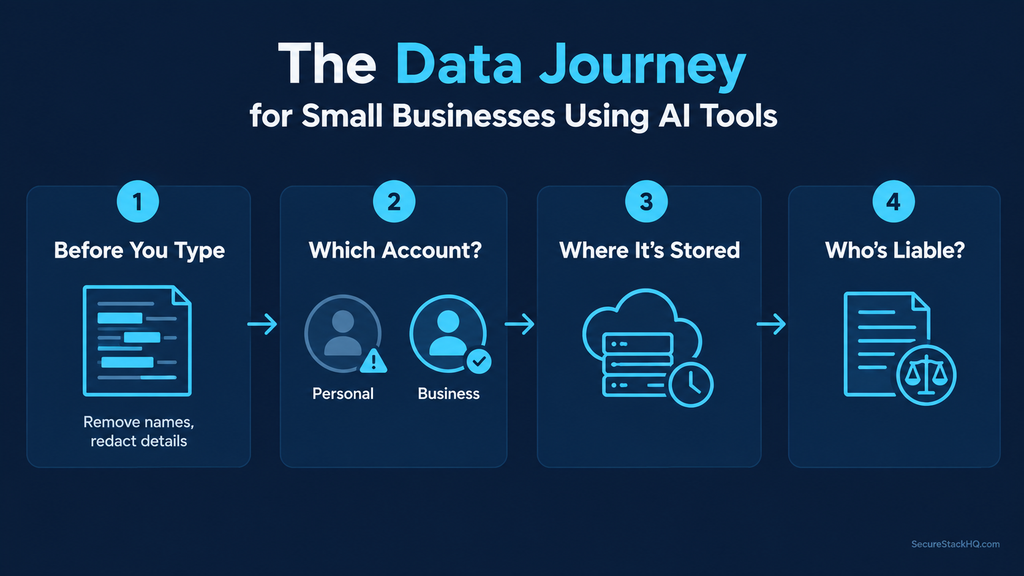
Fix: Write a one-page rule: name which AI tools are approved for work use, and name which kinds of information — client names, financial details, health records, and other personally identifiable information (PII) — are never allowed in any AI tool, free or paid. One page beats no rule at all, and it gives your team something concrete instead of a vague “be careful” — the next question is which account they’re using when they follow that rule.
2. Employees Are Using the Wrong Version of the Tool
Here’s the part most small businesses get wrong when thinking about ai and data privacy: it’s rarely the business-tier AI tool itself that’s the risk. It’s employees quietly using their own personal account instead, without realizing it works differently.
Here’s what’s actually true for each tool right now:
- ChatGPT: The Business and Enterprise plans are excluded from training by default — nothing to turn on. The risk shows up when someone uses their personal free or Plus account for work instead. On a personal account, check Settings → Data Controls for a toggle called “Improve the model for everyone,” and switch it off. We cover this specific tool in full in our ChatGPT Business Data Privacy guide.
- Microsoft Copilot: If your team signs in with a work account, commercial data protection kicks in automatically — no toggle needed, and you’ll see a “Protected” badge to confirm it. But the real Copilot risk isn’t training at all — it’s oversharing. Copilot can see and summarize anything an employee’s existing permissions already allow, which means it can just as easily surface an old finance file or HR spreadsheet that was left open to “anyone with the link” years ago and forgotten.
- Claude: The Team and Enterprise plans have never trained on customer data by default. For personal accounts (Free, Pro, Max), training is turned on by default, and users must manually switch off “Help Improve Claude” in Settings → Privacy to opt out.
Fix: Confirm your team is actually using the business-tier account, not a personal one signed up on a lunch break. Then, separately, do a quick check of who has access to your most sensitive files — that matters as much as any AI training setting. Even on the right account, though, there’s a second habit worth fixing: what your team actually types into it.
3. Removing a Name Doesn’t Make Data Anonymous
It’s tempting to think stripping a name off a document makes it safe to paste into an AI tool. This is one of the more overlooked pieces of ai data protection — in practice, removing a name rarely works on its own. A job title, a deal size, a city, and a timeline together can point to exactly one client even with the name gone — it doesn’t take much to piece it back together.
Fix: Before pasting anything, ask one question: could someone in your industry read this and guess who it’s about? If yes, take out more detail, or don’t paste it — summarize by hand instead. That habit only protects you while the data’s in your hands, though; once it’s sent, how long the vendor holds onto it is a separate question entirely.
4. You Don’t Know How Long the Vendor Keeps Your Data
Almost nobody asks this question before signing up for a new AI tool, but it matters more than it seems. A vendor that holds onto your chat history indefinitely is holding a growing pile of exposure — every extra month is another chance for that data to leak, get subpoenaed, or be misused down the line.
Fix: Search the vendor’s help center for the phrase “data retention.” If there’s a clear time window — 30 days, 90 days, until account deletion — you know what you’re working with. If you can’t find an answer anywhere in five minutes of looking, treat that silence as a real gap, not a non-issue. And the longer that data sits somewhere, the more it matters who else could get into the account holding it.
5. Your AI Account Is a Bigger Target Than You Think
An AI account tied to a work email, holding months of internal conversations, is genuinely valuable to an attacker — often more valuable than an email inbox, because it’s usually far less watched and far less protected. This is where privacy ai habits and everyday security habits start to overlap.
Fix: Turn on two-factor login for every AI account connected to your business, today. If your plan includes an activity or usage log for admins, glance at it every so often — most business-tier plans have one, and almost nobody checks it. Locking down the account is one thing; what your profession specifically requires you to protect is another.
6. Confidentiality Rules That Come With Your Profession
If your business is in a licensed or regulated field — law, healthcare, financial advice — AI privacy concerns run straight into professional confidentiality duties you already have. A general-purpose AI tool wasn’t built with your specific obligations in mind, and “the AI did it” isn’t a defense your regulator will accept. We covered one concrete example of this in our ABA Formal Opinion 512 guide for law firms, but the same underlying principle applies across any regulated profession.
Fix: Check whether your licensing board or professional association has published anything on AI use and client data. Several already have, and the guidance is often more specific and more practical than people expect. Even with all of this covered, one question still remains if something goes wrong on the vendor’s end.
7. You’re On the Hook Even If the Vendor’s Security Fails
If an AI vendor mishandles data you gave it, your client calls you first — not the vendor. You’re usually the one facing the fallout, regardless of whose system actually broke down — which is why ai privacy and security can’t really be treated as separate concerns for a small business.
Fix: Before relying heavily on any AI vendor, search their terms of service for two specific phrases: “limitation of liability” and “indemnification.” You don’t need to be a lawyer to read these sections — you’re just looking for one plain answer: if something goes wrong with our data, who pays for it, and is there a cap on how much? If the cap is unusually low relative to what your business handles, that’s worth knowing before you’re relying on the tool daily, not after.
🔗 Related Reading: Check our AI Vendor Risk Assessment guide for a step-by-step framework before you sign with any new AI vendor, or run through our OWASP LLM Top 10 Self-Scorecard to audit the technical side of your AI risk.
Score Your Business’s AI Privacy Concerns
Go through the 7 fixes above and count how many you can honestly say “yes, we’ve done this” to:
- 0–2: Meaningful exposure. Start with #1 and #2 this week — they take the least time and close the biggest gaps.
- 3–5: Better than most small businesses, but there are real gaps left. Pick one item to close this month.
- 6–7: You’re ahead of the curve. Revisit this list every few months, since vendor settings and terms do change.
None of this requires a legal team, a security hire, or a big budget — just a handful of five-minute checks. AI privacy concerns aren’t a reason to avoid these tools. They’re a reason to use them a little more deliberately than most small businesses currently do — and right now, most aren’t.
For a deeper, structured framework on evaluating AI tools before adopting them, the NIST AI Risk Management Framework is free and written for exactly this kind of practical use.