If you’ve started searching for the best vendor risk management software, you’ve probably noticed something frustrating: most “best of” lists read like they were written for a Fortune 500 company with a dedicated compliance team and a six-figure budget. They compare enterprise GRC suites on features you don’t need, at prices that don’t make sense for a growing business.
There’s also a bigger problem most of these lists miss entirely: vendor risk isn’t what it was even two years ago. Half the SaaS tools your business already uses have quietly added AI features in the last year — a chatbot here, an “AI-powered” reporting dashboard there — often without a new contract, a new security review, or any signal that your risk exposure just changed. Traditional vendor risk software was built to check things like SOC 2 status and data residency. Most of it still has no good way to ask: does this vendor train on our data? Did they just ship an AI feature we never vetted?
This guide isn’t a flat ranked list. It’s an honest look at what’s actually available, grouped by what it realistically covers, at prices small businesses can evaluate.
Quick Summary: Which Tool Fits Your Current Stage?
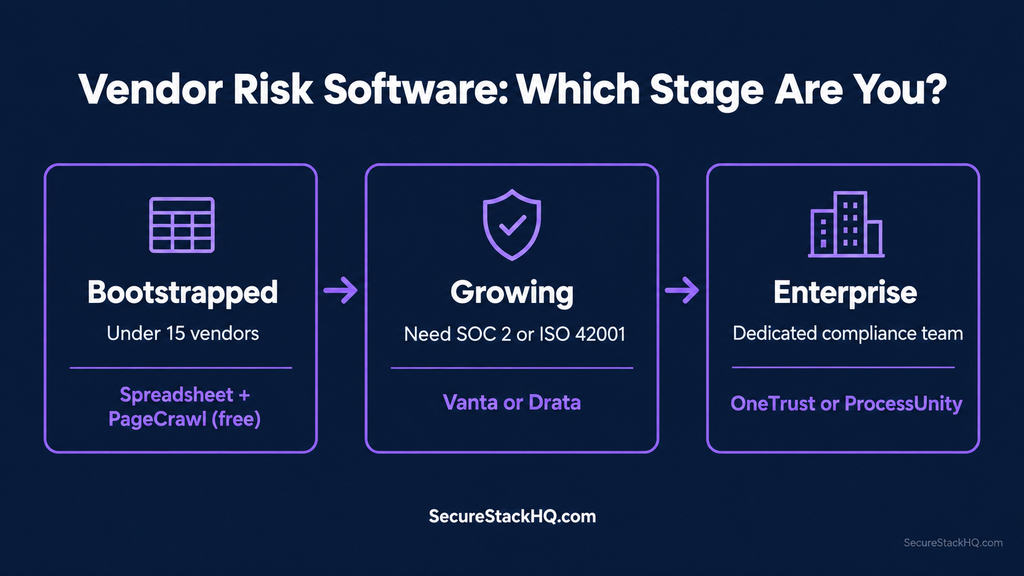
- Bootstrapped / under 15 vendors: Stick to spreadsheets and a free policy-change tracker like PageCrawl.
- Growing / need SOC 2 or ISO 42001: Vanta or Drata (AI-aware GRC platforms covering shadow AI and compliance automation).
- Enterprise / dedicated compliance team: OneTrust or ProcessUnity (heavy GRC suites with custom enterprise pricing).
What the Best Vendor Risk Management Software Needs to Check in the AI Era
Traditional third-party risk checks are still necessary — SOC 2 reports, breach history, data handling terms, contract language. But they’re no longer sufficient on their own. Three gaps show up again and again once AI enters the picture:
- Model training on your data. Does the vendor use your data to train or fine-tune models, and can you explicitly opt out?
- Sub-processor AI usage. Is your vendor quietly routing your data through a third-party AI provider you’ve never heard of, let alone vetted?
- Feature-update risk. A vendor can introduce meaningful new AI risk through a routine product update — no new contract, no new security questionnaire, nothing that would normally trigger a re-review.
This overlaps directly with our guide to shadow AI risk — the unvetted AI tools employees adopt on their own. Vendor risk software that only asks 2019-era questions won’t catch any of it.
Buying Triggers: When to Move Off Spreadsheets
You don’t need software the moment you sign your first vendor. Here are the concrete signals it’s time to look:
- You onboard your first AI-native vendor — a ChatGPT plugin, an AI-powered CRM feature, or anything with a foundational model behind it.
- A customer or partner sends you a security questionnaire you can’t answer confidently.
- Your vendor count crosses roughly 15–20, and nobody on the team remembers what half of them actually access.
If none of these apply yet, a well-maintained spreadsheet and the framework from our AI vendor risk assessment guide will carry you further than paying for software you’re not ready to use.
VRM Software Comparison Matrix
| Tool | Best For | Starting Price | AI-Risk Coverage |
|---|---|---|---|
| PageCrawl | Lightweight continuous monitoring | Free (6 pages), $8/mo (100) | Partial — tracks policy & subprocessor change alerts |
| Visualping | Change-detection monitoring | Free tier, paid from $10/mo | Partial — surface-level page change monitoring |
| Vanta | Teams needing AI-aware GRC & compliance | ~$10,000/yr (Core), VRM add-on $5,000–$15,000/yr | Strong — covers ISO 42001, NIST AI RMF, shadow AI detection |
| Drata | Compliance automation alternative to Vanta | $7,500–$15,000/yr (entry), scaling to $100K+/yr | Strong — automated vendor reviews & risk tracking |
| ProcessUnity | Mid-market to enterprise risk teams | $25,000/yr (SMB tier) | Traditional — legacy GRC questionnaires |
| OneTrust | Enterprise teams already on OneTrust | Custom quote | Traditional — heavy, custom implementation |
Vendor Risk Tools Reviewed, Grouped Honestly
1. Lightweight and affordable (continuous monitoring)
PageCrawl isn’t a full GRC suite, and it doesn’t pretend to be. It’s a continuous monitoring layer that watches your vendors’ trust pages, subprocessor lists, and privacy terms, alerting you the moment something changes. Free for up to 6 pages, $8/month for 100 pages. If you’re past spreadsheets but not ready for a five-figure platform, this is an efficient next step.
Visualping plays a similar role to PageCrawl, offering visual site-change alerts with a usable free tier and paid plans starting around $10/month.
2. AI-aware GRC platforms (mid-market pricing)
Vanta is currently one of the most AI-risk-relevant platforms available. Its coverage includes SOC 2, ISO 27001, ISO 42001 (for AI management systems), and the NIST AI RMF. Its vendor discovery feature helps surface shadow AI and unvetted SaaS tools across your organization. The catch: core pricing starts around $10,000/year, and the Vendor Risk Management module adds another $5,000–$15,000/year. Worth it once you have real AI-vendor exposure and customers asking hard security questions, but not before.
Drata is a direct competitor to Vanta that automates continuous compliance and vendor tracking. Entry pricing starts around $7,500–$15,000/year for a single framework and up to 50 employees, but scales to $100,000+/year at enterprise tiers — the same trade-off you’re making with Vanta. Effective if you’re actively working toward SOC 2 or ISO compliance alongside third-party vendor reviews.
3. Legacy enterprise GRC (usually overkill for small teams)
ProcessUnity and OneTrust are both capable enterprise platforms, but they’re built and priced for organizations with dedicated risk departments. ProcessUnity’s SMB package starts around $25,000/year, while OneTrust requires custom quote-based contracts and extensive onboarding. Neither provides significantly better AI-specific risk coverage than Vanta or Drata to justify the added complexity for a smaller team.
The takeaway: there isn’t a cheap, all-in-one “AI-aware” vendor risk platform yet. You’re choosing between an inexpensive change-monitoring tool without AI risk scoring, or a full GRC platform priced for mid-market budgets.
5 Questions to Ask Before Buying VRM Software
Before you settle on the best vendor risk management software for your team, ask these five questions
- Does this tool re-evaluate a vendor when they ship a new feature, or only at initial onboarding?
- Can it flag AI-specific risks (e.g., model training on customer data, undisclosed AI sub-processors)?
- Is pricing transparent, or does it require multiple sales calls to discover true costs?
- What happens to your data if you cancel? Can you cleanly export your vendor risk records?
- Does the free trial let you test with real vendors, or only a canned demo account?
Conclusion & Next Steps
If you’re currently tracking vendors in a spreadsheet, use the free NIST AI Risk Management Framework to define your review criteria before committing to software.
When you outgrow manual tracking, start with a lightweight monitoring tool like PageCrawl. Upgrade to an AI-aware compliance platform like Vanta or Drata once third-party AI risk presents a measurable operational or sales blocker.
If you’re unsure whether an AI tool in your stack is safely configured or compliant with data privacy regulations, read our step-by-step guide on AI Vendor Risk Assessment.